
ボタンコントロールのPaintイベントにより、ボタンの表面を自分で描画することができるようになります。なお、ボタンコントロールのFlatStyleプロパティはSystem以外である必要があります。
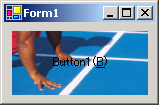
次の例では、Button1に設定されている背景イメージをボタンの大きさに合わせて描画し、Button1.Textプロパティに設定されている文字列を適当な方法で描画しています。
'Imports System.Drawing

'フォームのLoadイベントハンドラ
Private Sub Form1_Load(sender As Object, e As System.EventArgs) _
        Handles MyBase.Load
    'Button1の背景画像を設定
    Button1.BackgroundImage = Image.FromFile("C:\test\1.bmp")
    'Button1のPaintイベントハンドラを追加
    AddHandler Button1.Paint, AddressOf Button1_Paint
End Sub

Private Sub Button1_Paint(sender As Object, e As PaintEventArgs)
    Dim btn As Button = DirectCast(sender, Button)
    'ボタンの背景画像をボタンの大きさに合わせて描画
    e.Graphics.DrawImage(btn.BackgroundImage, btn.ClientRectangle)

    'ボタンのTextを描画する準備
    Dim sf As New StringFormat()
    '文字列を真ん中に描画
    sf.Alignment = StringAlignment.Center
    sf.LineAlignment = StringAlignment.Center
    '&がアンダーラインになるようにする
    sf.HotkeyPrefix = System.Drawing.Text.HotkeyPrefix.Show
    'Brushの作成
    Dim brsh As Brush = New SolidBrush(btn.ForeColor)
    '文字列を描画
    e.Graphics.DrawString(btn.Text, btn.Font, brsh, btn.ClientRectangle, sf)
    '後始末(実際には、Paintイベントの度に作成と解放を繰り返すのは良くない)
    brsh.Dispose()
    sf.Dispose()
End Sub
//using System.Drawing;

//フォームのLoadイベントハンドラ
private void Form1_Load(object sender, System.EventArgs e)
{
    //Button1の背景画像を設定
    Button1.BackgroundImage = Image.FromFile("C:\\test\\1.bmp");
    //Button1のPaintイベントハンドラを追加
    Button1.Paint += new PaintEventHandler(Button1_Paint);
}

private void Button1_Paint(object sender, PaintEventArgs e)
{
    Button btn = (Button)sender;
    //ボタンの背景画像をボタンの大きさに合わせて描画
    e.Graphics.DrawImage(btn.BackgroundImage, btn.ClientRectangle);

    //ボタンのTextを描画する準備
    StringFormat sf = new StringFormat();
    //文字列を真ん中に描画
    sf.Alignment = StringAlignment.Center;
    sf.LineAlignment = StringAlignment.Center;
    //&がアンダーラインになるようにする
    sf.HotkeyPrefix = System.Drawing.Text.HotkeyPrefix.Show;
    //Brushの作成
    Brush brsh = new SolidBrush(btn.ForeColor);
    //文字列を描画
    e.Graphics.DrawString(btn.Text, btn.Font, brsh, btn.ClientRectangle, sf);
    //後始末(実際には、Paintイベントの度に作成と解放を繰り返すのは良くない)
    brsh.Dispose();
    sf.Dispose();
}
注意:この記事では、基本的な事柄の説明が省略されているかもしれません。初心者の方は、特に以下の点にご注意ください。